
CLIMS stands for Centralized License Integration and Management System. It’s a plugin to LicenseAnalyzer and a tool for administering license servers, as well as managing license and option files more efficiently. Think of it as a central control panel for everything related to license files and license servers.
“Control your own destiny or someone else will.”
— Jack Welch, former CEO of General Electric
With CLIMS, we help organizations take control of their license infrastructure rather than leaving it to chance or fragmented processes.
Here are the fundamental ideas behind CLIMS, explained simply:
CLIMS is designed to support a wide range of users across different industries and departments. Whether you are a customer managing your own license infrastructure or a partner supporting clients, CLIMS offers value through simplicity, visibility, and control.
IT & System Administrators are the primary users of CLIMS. These professionals manage license servers and ensure software availability across the organization. With CLIMS, they can:
CLIMS streamlines their daily operations and reduces the risk of manual errors.
Procurement and Administrative teams use CLIMS to manage license renewals, vendor coordination, and compliance documentation. With CLIMS, they can:
This reduces manual tracking and improves operational efficiency.

Partners and Managed Service Providers use CLIMS to support clients with license management. With CLIMS, they can:
This enhances service delivery and strengthens client trust.

CLIMS includes an intuitive web interface designed to simplify license management. It provides both visual dashboards and detailed technical views, enabling users to monitor usage, manage license servers, and configure license files with confidence.
From real-time monitoring to accurate file comparisons, the interface empowers administrators to make informed decisions quickly and efficiently.
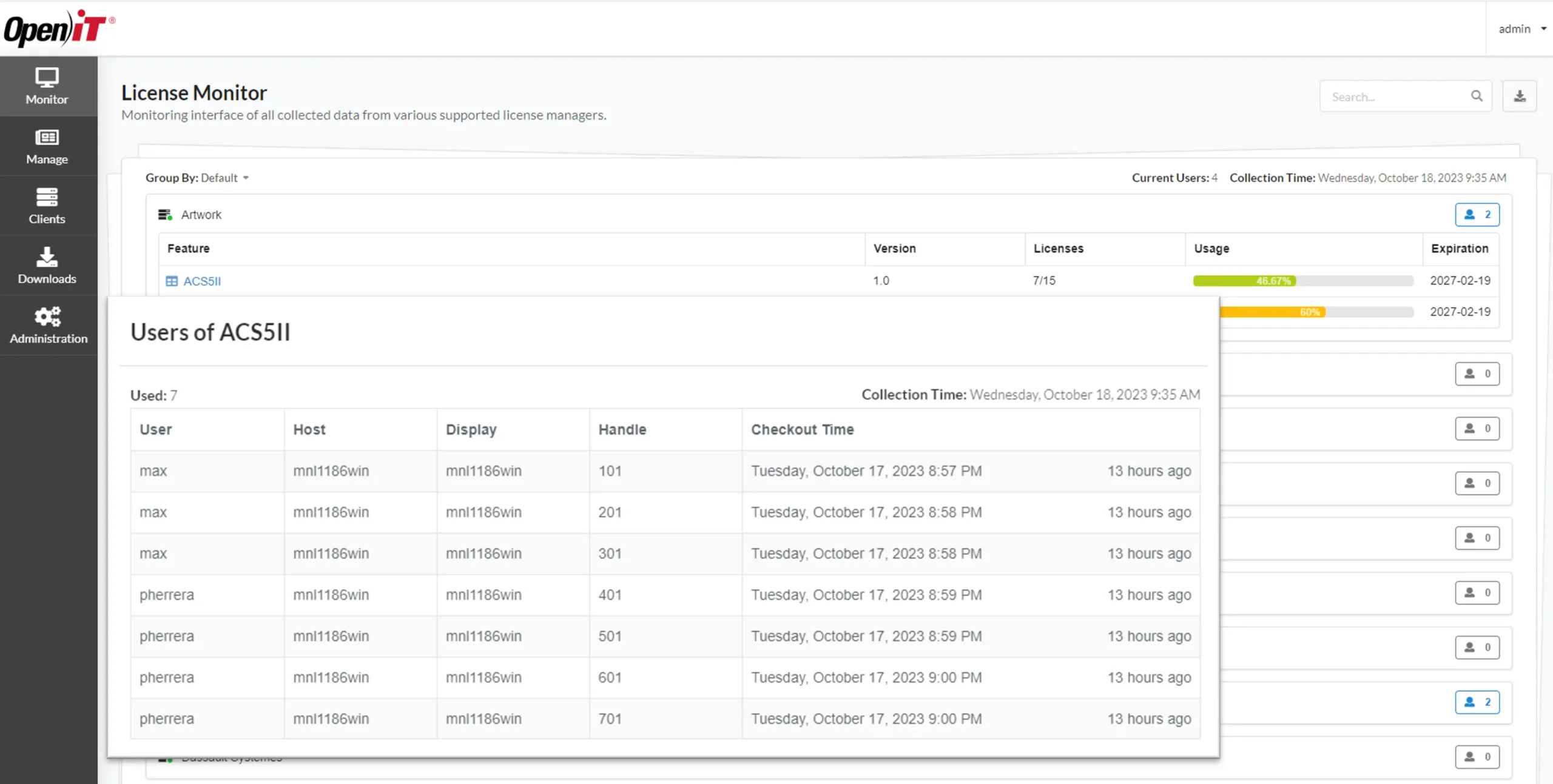
CLIMS provides real-time visibility into license usage across features and license managers. In this example, the feature ACS5II is using 7 of 15 available licenses. Graphical bars indicate both usage percentage and license expiration dates.
The table offers a detailed view of active users. This level of insight helps identify heavy users, long checkouts, or potential license misuse. It also enables administrators to proactively manage license availability and prevent denials by tracking who is using what, when, and for how long.
These screenshots show two different views of the License Managers section in the CLIMS web interface.
This module provides an overview of all license managers connected to Open iT, including:
In the card view (first screenshot), each box represents a license manager with quick info like hostname, ports, and license vendor (FlexNet, RepriseLM, etc.).
Color coding helps to identify the status:
The list view (second screenshot) displays the same data in table format, with additional columns such as server type, operating system, and Last Seen time. This makes it easier to detect disconnected or outdated license servers.
Together, these views provide administrators with a centralized, real-time picture of license infrastructure health and connectivity
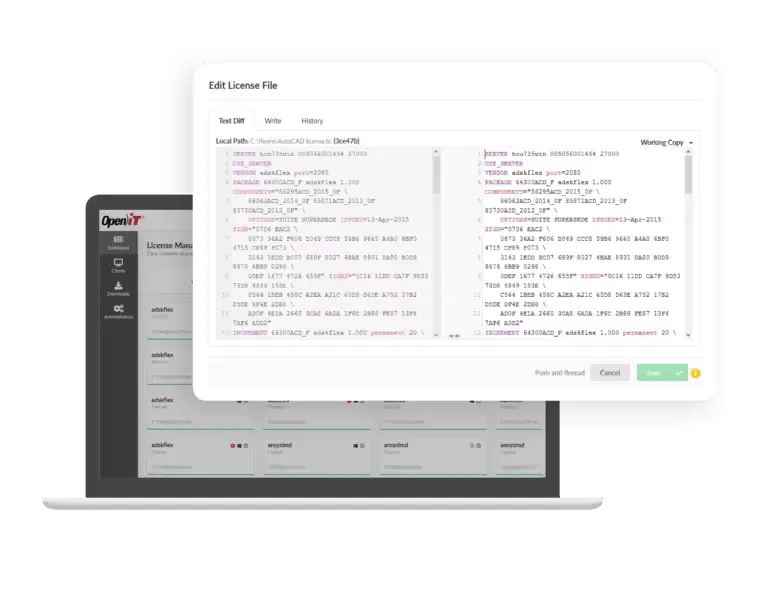
CLIMS enables users to compare and configure license files through an intuitive interface.
In the first image, the “Changes” tab displays a detailed summary of modifications between the local license file and the working copy.
Each feature (e.g., ACS5II, PolySpace_Bug_Finder) is listed with color-coded tags (Added, Deleted, Modified), and the right panel provides a breakdown of the exact changes, such as:
This view simplifies license validation before updates are applied.
The second image shows the “Text Diff” view, a more technical comparison. It highlights line-by-line changes between license files, similar to a Git diff.
This view is particularly useful for advanced users who need to track modifications in syntax, signatures, or license parameters.
Together, these tools empower administrators to safely manage license configurations by clearly showing what is changing and why—before any updates are committed.

Your information will never be shared with any third party